Hafilat Balance Check: How to Check Your Abu Dhabi Bus Card Balance
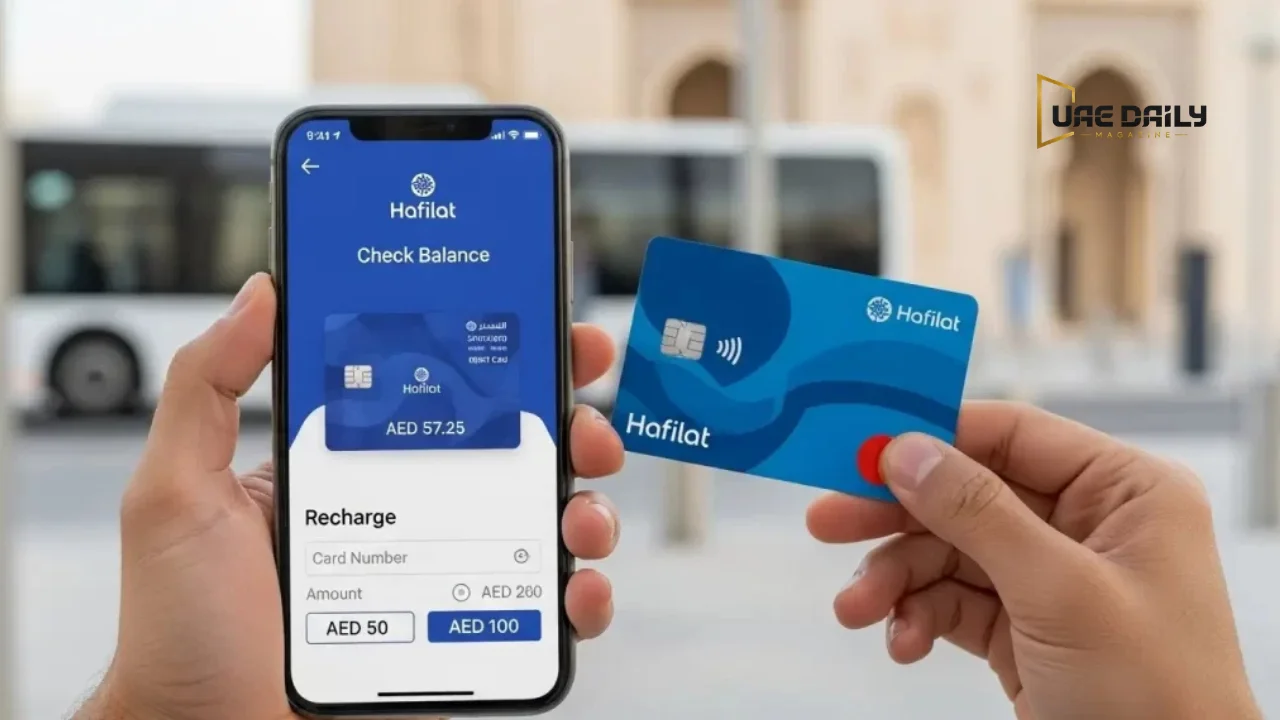
Abu Dhabi buses run on a cashless system. If your card is short at the door, you don’t have the option to pay the driver a few dirhams and move on. You step off and wait for the next bus, which on a Mussafah route can mean twenty minutes gone. That’s why a quick Hafilat balance check before leaving home matters more here than in cities where cash still works. This guide covers every method that actually works in 2026, how much time each one costs you, and the small details that trip people up on the official portal.
You can check your Hafilat balance through the Darb app, the official portal at hafilat darb ae, any ticket vending machine at a bus station, the validator when you tap onto a bus, or a Customer Happiness Centre. You’ll need the card’s serial number printed on the back for the online methods. Abu Dhabi Mobility does not list an SMS or phone service for reading your balance remotely.
Hafilat Balance Check Methods at a Glance
Some methods take seconds. Others need you to already be standing at a bus station. This table shows the trade-off before you pick one.
| Method | Where it works | Speed | Card number needed |
|---|---|---|---|
| Darb app | Anywhere with data | Instant | Yes, once during setup |
| hafilat.darb.ae | Any browser | Instant | Yes, every time |
| Ticket vending machine | Bus stations and stops | Instant | No, just tap the card |
| Bus validator | On the bus | Instant but brief | No |
| Customer Happiness Centre | Bus stations and airport | Counter wait | No |
| Partner outlets | Lulu, SPAR and similar | Counter wait | No |
The app is the only method that works before you leave the house without retyping anything. For most daily commuters, that alone makes it worth the one-time setup.
How to Check Hafilat Card Balance Online
The official portal is the method most people find first, and it works fine on a phone browser. You don’t need an account just to read a balance.
Step 1: Open the Official Hafilat Portal
Go to hafilat.darb.ae in your browser. This is the platform Abu Dhabi Mobility names on its own recharge page, so it’s the one to trust. Plenty of lookalike sites rank well in search results and ask for your card number. Check the address bar before typing anything.
Step 2: Find the Balance Enquiry Option
Look for the card balance or recharge option on the homepage. New users can register, but registration isn’t required for a simple balance check. Skip it if you’re in a hurry.
Step 3: Enter Your Card Serial Number
Turn your card over. The serial number is printed on the back, and it’s the number the portal wants. Type it carefully.
Step 4: View Your Balance and Expiry
Your remaining credit appears on screen in AED. The expiry date usually shows alongside it, which is worth a glance even when your balance looks healthy.
The Card Serial Number Mistake Most People Make
This is where a lot of people get stuck, and it’s a genuinely confusing bit of design.
Hafilat serial numbers start with a 01 prefix. On some screens the portal already displays that prefix in a separate field or as a fixed selection. If you then type the full number including the 01, you’ve entered it twice, and the system rejects your card as invalid.
I’ve watched people give up at this exact screen and assume their card is broken. It isn’t. Enter only the digits that follow the 01 when the field already shows the prefix, and enter the complete number when it doesn’t. One look at the field before typing saves the whole headache.
How to Check Hafilat Balance on the Darb App
The app is the fastest repeat method. You add your card once, then a Hafilat balance check takes one tap whenever you open it.
Download and Set Up the Darb App
Search for Darb in the App Store or Google Play. Abu Dhabi Mobility runs the platform, so check the publisher name before installing. Fake transport apps do appear in app stores. Sign up with your mobile number and email, then set a password.
Add Your Hafilat Card to the App
Open the card section and add a new card using the serial number from the back. Once saved, you won’t need to type it again. Riders with more than one card, such as a parent managing a child’s card, can add several and name them separately.
Set Up Low Balance Alerts
If the app offers balance notifications, turn them on. A student in Al Ain travelling twice a day burns through credit faster than they expect, and an alert at AED 15 gives enough warning to top up calmly instead of at the bus door.
Hafilat Balance Check at Ticket Vending Machines
Ticket vending machines, usually called TVMs, are the best option when you have no data or your phone is dead. They also print a receipt, which is useful if you’re tracking spending.
Where to Find Hafilat Machines in Abu Dhabi
Abu Dhabi Mobility lists these machines at bus stations and bus stops across the emirate. The authority also runs a location map on its Darbi site, which is a reliable way to find your nearest one rather than guessing. Abu Dhabi Central Bus Station at Al Wahda, Mussafah, Bani Yas and the airport bus areas are the busiest spots.
How to Check Your Balance at a TVM
Touch the screen to wake the machine and pick English or Arabic. Place your card flat on the reader pad. Choose the balance enquiry option, and your credit appears within a second or two. You can top up from the same screen if the number looks low, and that credit lands on the card immediately.
How to Check Your Balance on the Bus Validator
When you tap onto a bus, the validator flashes your remaining balance on its small display. It’s free and instant. It’s also easy to miss, because the number disappears within a couple of seconds while you’re still moving down the aisle.
Treat the validator as a confirmation, not a planning tool. By the time you see the number, you’re already on the bus. If your credit is short, you’re getting off again.
Is There a Hafilat Balance Check Number?
This question comes up constantly, and the honest answer is more useful than the one circulating online.
The Official Abu Dhabi Mobility Call Centre
Abu Dhabi Mobility publishes 800555 as its service support call centre, and that number appears in the header of every page on its official site. Call it for card problems, replacements, lost cards or account issues.
Note the difference between support and self-service. The call centre handles card problems. It isn’t set up as an automated balance reading line, so don’t expect to key in your serial number and hear a figure.
What About SMS and USSD Codes?
Several websites list an SMS shortcode and a USSD code for Hafilat balance enquiries. You’ll see these repeated across search results and even in AI-generated answer boxes.
Worth knowing before you rely on them: Abu Dhabi Mobility doesn’t list SMS or USSD among its official balance channels. Its recharge page names ticket vending machines, recharge machines, Customer Happiness Centres, MBME machines and the website, with no messaging option mentioned. These codes may have worked at some point, or may work through a third party service, but they aren’t documented by the authority.
So if an SMS goes unanswered, nothing is wrong with your card. Use one of the five documented methods instead.
Where to Check Your Hafilat Balance in Person
Sometimes you want a person to run the Hafilat balance check for you, particularly when something seems wrong with the card.
Customer Happiness Centres
Abu Dhabi Mobility operates these offices at bus stations and at the airport, open throughout the week. Staff can read your balance, print a transaction history, replace a damaged card and sort out failed recharges. If your card stopped working entirely, this is the place to go rather than a machine.
Lulu, SPAR and Other Partner Outlets
Abu Dhabi Mobility names several retail partners where Hafilat cards are sold and recharged. These include Abu Dhabi Cooperative Society (SPAR), Al Ain Cooperative Society, and all branches of Lulu Hypermarket and Lulu Exchange across Abu Dhabi, Al Ain and Al Dhafra.
That last one is convenient for a lot of residents, since the weekly grocery run and the card top up happen in the same trip. If you’re already at the counter sorting out your Lulu balance check, adding credit to your Hafilat card takes another thirty seconds.
Real Situations Where a Balance Check Saves You
A shift worker in Mussafah catching the 6 am bus has no fallback if the card is short. The next service might be twenty minutes out, and that’s the difference between on time and late.
A student commuting daily in Al Ain gets through credit faster than expected, because two trips a day add up quietly across a month. Checking every Sunday evening turns a recurring problem into a habit.
Someone landing at Zayed International with an old card in their wallet has no idea whether the credit survived. A TVM at the airport bus area answers that before they join the queue.
Then there’s the commuter who topped up online at 8 am and boarded at 8:15, expecting the credit to be there. That one catches people out often enough to deserve its own explanation below.
How to Recharge Your Hafilat Card
Not all top-ups land at the same speed. This is the single most useful thing to know about recharging, and most guides skip it.
Recharge online at hafilat.darb.ae.
Open the portal, enter your card serial number, pick an amount and pay. Convenient, but slow to land.
Recharge at a Ticket Vending Machine
Tap your card, choose an amount and pay at the machine. The credit is on your card before you walk away.
Recharge at Retail Partners and MBME Machines
Lulu, SPAR and the cooperative societies handle top-ups at the counter. MBME machines sit in commercial centres and buildings around the city.
Why Your Online Recharge Takes Two Hours
Abu Dhabi Mobility states that balance added through the website or an MBME machine reflects on the card after two hours. Credit added at a ticket vending machine, a recharge machine or a Customer Happiness Centre reflects immediately.
Your money isn’t lost during that gap. The card simply hasn’t synced yet. If you’re travelling within the hour, use a machine rather than the website.
| Recharge channel | Where | Speed |
|---|---|---|
| Sales and recharge machine (TVM) | Bus stations and bus stops | Immediate |
| Recharge machine | Stations, stops, shopping centres | Immediate |
| Customer Happiness Centre | Bus stations | Immediate |
| MBME machine | Commercial centres and buildings | About 2 hours |
| Website (hafilat.darb.ae) | Online | About 2 hours |
Hafilat Card Price, Types and Fees in 2026
Abu Dhabi Mobility publishes card details on its official site, though fees can be revised, so treat the counter as the final word.
Anonymous Card
Abu Dhabi Mobility lists the anonymous Hafilat card at AED 10 with a validity of 16 years. No documents are needed. You buy it and use it. The catch is that a lost anonymous card takes its balance with it, unless the card has been linked to a UAE identity card.
Personalized Card
The personalized card links to your Emirates ID and is issued at Customer Happiness Offices. Its main advantage is balance transfer, so credit can be moved to a replacement if the card is lost or damaged. For anyone keeping AED 100 on a card, that protection is usually worth the extra step.
Student, Senior Citizen and People of Determination Cards
These categories can access subsidised travel products. Abu Dhabi Mobility lists a 30-day pass at AED 80 for eligible beneficiaries, with a valid Emirates ID required at a Customer Happiness Office for a first application. Eligibility rules vary by category, so confirm yours at the counter.
| Card type | Price | Validity | Balance transfer if lost |
|---|---|---|---|
| Anonymous | AED 10 | 16 years | Not available unless linked to a UAE ID |
| Personalized | Confirm at Customer Happiness Office | Long term | Available |
| Student / Senior / People of Determination | Subsidised products, 30-day pass from AED 80 for eligible users | Varies by product | Available on registered cards |
Hafilat Card Validity, Expiry and Balance Activation
Two different clocks run on your card, and confusing them is common.
How Long Your Card Stays Valid
The anonymous card carries a 16-year validity according to Abu Dhabi Mobility. The card itself won’t quietly expire on you.
The Three-Month Recharge Rule
This is the rule that surprises people. Abu Dhabi Mobility states that the maximum balance you can hold is AED 150, and that credit carries a validity of three months from the recharge date. You activate it by using the card for travel or by tapping it on a sales and recharge machine.
In practice, this only bites occasional riders. Someone who loads AED 100 before a holiday, then doesn’t touch the card for four months, can come back to a problem that a daily commuter never encounters. If your card sits unused for long stretches, load smaller amounts more often.
It also helps to know your own funds before topping up. Riders paid through a ratibi payroll card or checking a fab balance first avoid the annoyance of a declined payment halfway through a recharge, especially near the end of the month.
Common Hafilat Card Problems and How to Fix Them
| Problem | Likely cause | What to do |
|---|---|---|
| Card number rejected online | The 01 prefix entered twice | Enter only the digits after 01 when the field already shows the prefix |
| Balance not updated after online top up | Website and MBME credit takes about 2 hours | Wait, then tap a validator or machine to sync. Don’t pay twice |
| Validator beeps red at boarding | Balance below the fare needed | Top up at a station machine for immediate credit |
| Card not detected at all | Dirty, bent or damaged card | Wipe it, tap flat on the reader, then visit a Customer Happiness Centre |
| Higher fare than expected | Missed tap out on exit | Always tap when leaving the bus, not only when boarding |
| Card unused for months | Recharge validity lapsed | Tap on a recharge machine, or ask staff to check the card status |
| Lost card with credit on it | Anonymous cards carry no protection | Call 800555. Consider a personalized card next time |
Using Your Hafilat Card in Al Ain and Al Dhafra
Hafilat covers the whole Emirate of Abu Dhabi, not just the capital. The same card works on public buses in Abu Dhabi city, Al Ain and Al Dhafra, and every method in this guide applies identically.
Searches for an Al Ain bus card or a UAE bus card often lead people here, and the answer is that a Hafilat balance check works the same way in all three regions. Worth noting the boundary though: Dubai runs a separate card, so a Hafilat card won’t work on the Dubai Metro or RTA buses.
Frequently Asked Questions
How do I check my Hafilat balance online?
Enter your card serial number at hafilat.darb.ae and your balance appears on screen. The Darb app does the same and saves the number so you don’t retype it. Neither requires an account for a basic balance check.
Is there a Hafilat balance check number?
Abu Dhabi Mobility does not publish an SMS or automated phone line for reading your balance. Its support call centre is 800555, which handles card problems rather than balance enquiries. Use the app, the portal or a station machine instead.
What is the minimum balance needed to board a bus?
You need at least enough credit to cover your fare, and the validator will refuse the card if you’re short. Exact fares vary by distance and route, so confirm current rates with Abu Dhabi Mobility. Keeping a small buffer on the card avoids the problem entirely.
Why has my online recharge not shown up yet?
Credit added through the website or an MBME machine takes about two hours to reflect, according to Abu Dhabi Mobility. Machines at stations apply credit immediately. Wait out the two hours before paying again, then tap a validator or machine to sync.
How long is a Hafilat card valid?
Abu Dhabi Mobility lists the anonymous card as valid for 16 years. Balance validity is separate and shorter at three months from the recharge date. Using the card for travel activates that credit.
Can I use my Hafilat card in Al Ain?
Yes, the same card works on public buses across Abu Dhabi city, Al Ain and Al Dhafra. All balance check and recharge methods work the same way in each area. It won’t work on Dubai transport.
Final Thoughts
The methods that matter here are simple. The app for daily checks, a station machine when you need credit right now, and 800555 when something is actually wrong with the card.
The details worth remembering are the ones that catch people out. Online top-ups take about two hours while machines are instant. The 01 prefix confuses the portal. Balance carries a three-month clock even though the card lasts 16 years. Check your card on a Sunday evening rather than at a bus door on Monday morning. That habit costs nothing and saves the walk home.
Card prices, fares and service channels can change. Confirm current details with Abu Dhabi Mobility before travelling.