Du Number Check Code: How to Find Your Du Mobile Number in the UAE (2026 Guide)
New SIM, new phone, or just a memory blank- forgetting your own du number happens to almost everyone in the UAE at some point. Maybe you need it to recharge, maybe a form is asking for it, maybe a friend just asked you to confirm it. In my experience helping people sort out UAE mobile issues, a quick du SIM number check is one of those small problems that feels bigger than it is. This guide covers every reliable du number check code and method available in 2026, verified against official sources, so you’re not left guessing which code actually works.
The du number check code is *116#, dialed directly from your phone’s keypad, it displays your registered du mobile number on screen within seconds, without needing internet or airtime balance. If USSD isn’t available, you can also check your number through the My du app, the du website, your SIM packaging, or by calling du customer care at 155.
What Is the Du Number Check Code?
A du number check code is simply a short dial command, known as USSD, that powers a fast du mobile number check straight from your keypad. It works on any phone, smartphone or basic handset. It won’t touch your data or airtime balance. du is operated by Emirates Integrated Telecommunications Company, one of only two licensed mobile operators in the UAE alongside e& (Etisalat), both regulated by the Telecommunications and Digital Government Regulatory Authority, or TDRA. That regulatory oversight is why USSD codes, SMS shortcodes, and customer service numbers stay fairly standardized across the network.
Honestly, most people only need this once or twice a year. But when you need it, you need it fast, which is exactly what the *116# code is built for.
Why You Might Need to Check Your Du Number
You’ll usually need your du number in a handful of situations. New SIM cards don’t always come with the number memorized, especially if you activated it in a rush at the airport or a mall kiosk. One mistake I keep seeing is people assuming their number is saved in their phone’s contact list — it often isn’t, particularly right after activation.
- Setting up a new SIM or eSIM
- Registering for banking, delivery, or government apps
- Confirming the number before sharing it with someone
- Verifying which line is active on a dual-SIM phone
- Topping up or transferring credit to the correct line
Take a new resident who just landed in Dubai and picked up a prepaid du SIM at the airport. She needs the number immediately to register for a ride-hailing app, but the SIM packaging is already buried in her bag somewhere. Dialing *116# gets her the number in under ten seconds, no digging required.
Du Number Check Code – All Methods
du gives you six reliable ways to check your number, and each one fits a different situation, whether you have signal, data, or neither.
USSD Code (*116#)
Dial *116# from your phone’s keypad and press call. Your registered DU number appears on screen almost instantly, and this works on prepaid and postpaid lines alike. It needs a mobile signal. It doesn’t need internet or balance. That makes it the fastest option for most people. I’ve seen this fail occasionally on dual-SIM phones when the wrong SIM slot is set as the calling line, so if it doesn’t respond, check that first.
My du App
If you’d rather see your full account alongside your number, the My du app works well. Download it from the Google Play Store or Apple App Store, log in with your registered credentials, and your number sits right on the account dashboard along with your balance, usage, and bill details.
du Website / MyAccount Portal
For desktop users, du’s MyAccount portal on du.ae mirrors what the app shows. Log in with your ID or registered email, open the account section, and your mobile number appears in your profile details. This method suits postpaid customers who are already reviewing a bill or managing multiple lines.
SIM Packaging & Activation Message
Your du SIM number is often printed right on the packaging. It’s worth checking before you recycle it. If the packaging is long gone, search your SMS inbox for the welcome or activation message du sends when a new line goes live; it usually states the number directly.
Phone Settings (iPhone & Android)
On an iPhone, go to Settings, tap Phone, and your number appears under “My Number.” On Android, the exact path varies by brand, but it’s usually Settings, About Phone, then SIM Status. This method only works if the number was saved to the SIM profile during activation, so it doesn’t always show up on inactive or recently swapped SIMs.
Customer Care (155)
Call du customer care at 155. It works when every other method fails. An agent will verify your identity, usually through your Emirates ID or registered details, and confirm your number over the phone. It’s slower than USSD, but it’s the most reliable fallback if your SIM itself is having issues.
Comparison: Which Method Should You Use?
Six methods can feel like a lot when you just want a number. Here’s how they stack up.
| Method | Needs Internet? | Speed | Best For |
| USSD (*116#) | No | Instant | Fastest, no data needed |
| My du App | Yes | Instant | Full account view |
| du Website | Yes | Instant | Desktop, postpaid users |
| SIM Packaging | No | Instant | One-time reference |
| Phone Settings | No | Instant | Quick device check |
| Customer Care (155) | No (voice call) | A few minutes | SIM issues, verification |
How to Check Your Du Number Without Balance or Internet
USSD is the answer here. Dialing *116# doesn’t draw from your airtime balance or use any data, so it works even on an empty prepaid line. Your phone settings and SIM packaging are also offline options, since neither depends on network signal or connectivity, only on what’s already stored on the device or printed on the card.
Say a delivery driver’s prepaid line runs out of credit mid-shift and he needs to confirm his own number for a customer. USSD still works with zero balance, so *116# gets him the answer without needing to top up first.
Du vs Etisalat – Don’t Mix Up the Codes
This is worth spelling out clearly, because a lot of guides online get it wrong. du’s number check code is *116#. e& (Etisalat)’s code is *101#, followed by a short on-screen menu. They’re not interchangeable, and dialing the wrong one on the wrong network usually returns an error or no response at all.
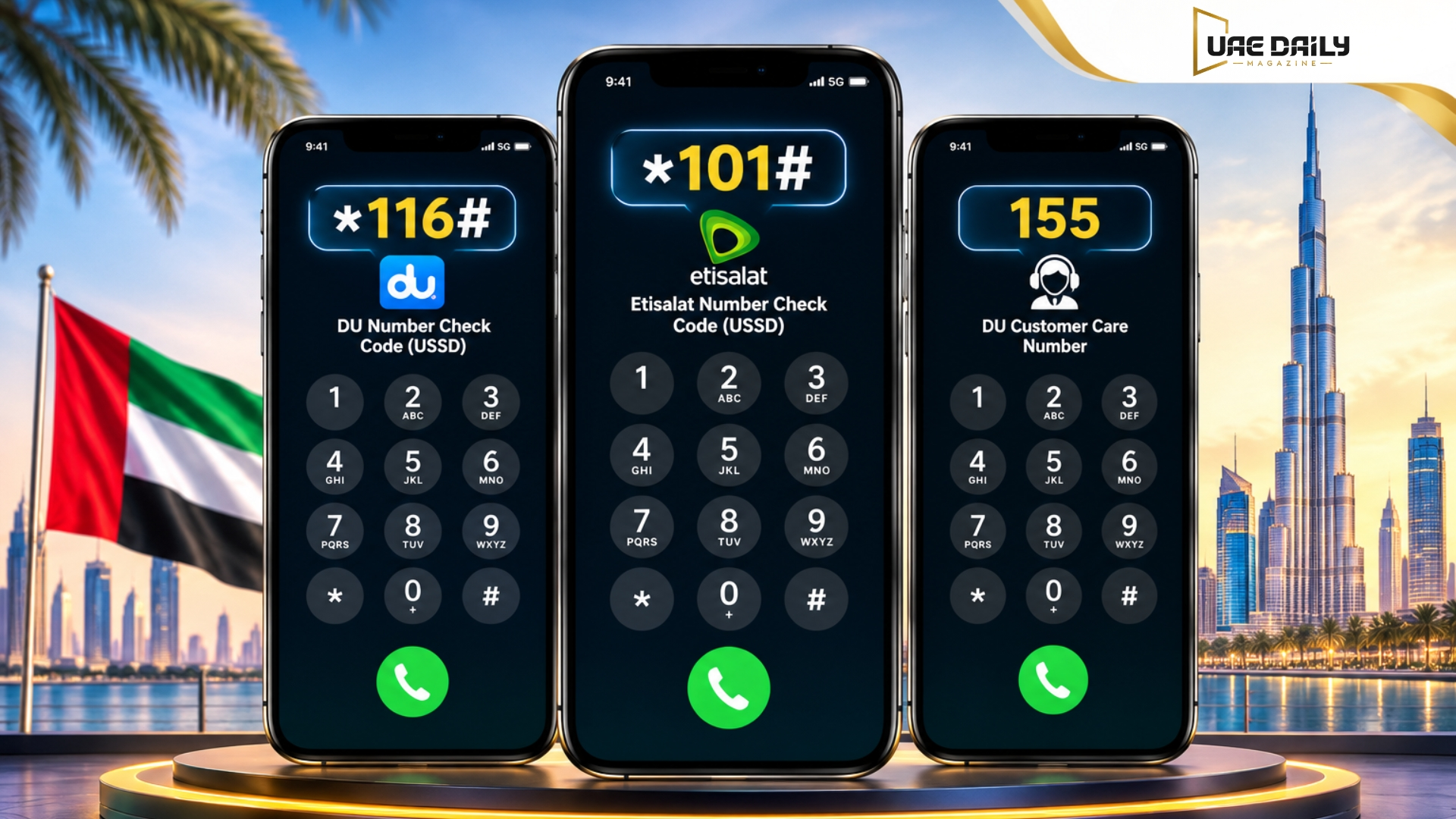
In my experience, this mix-up happens most with people who’ve switched carriers recently and are still running the old code out of habit. If *116# doesn’t respond and you’re not sure which network you’re on, check your SIM packaging or the carrier name in your phone’s signal bar before troubleshooting further.
Number portability also complicates things. If you ported your number between du and Etisalat at some point, don’t assume the prefix alone tells you which network you’re actually on today. When in doubt, confirm with customer care rather than guessing.
Examples of Checking Your Du Number in Daily Use
- A construction worker in Sharjah picks up a new prepaid du line and dials *116# on his lunch break to save the number before sharing it with his site supervisor.
- A student in Dubai registers for university WiFi and needs her du number for the form, so she checks the My du app since she’s already logged in, reviewing her data balance.
- An office worker on a dual-SIM iPhone switches his primary line and confirms the new du number through Settings > Phone before updating his email signature.
- A tourist who bought a short-term du prepaid SIM calls customer care at 155 after losing the SIM packaging, since USSD wasn’t responding on his unlocked phone.
- A small business owner checks her postpaid du number through the MyAccount portal while reviewing her monthly invoice for expense reports.
Common Du Number Check Problems & Fixes
USSD failing to respond is the most common complaint, and it’s usually one of three things: weak signal, the wrong SIM selected on a dual-SIM phone, or a temporary network issue. Restarting the phone or re-inserting the SIM often clears it. If the My du app won’t show your number, check that you’re logged into the correct account, since dual-SIM users sometimes register accounts under a different line by mistake. An outdated app version can also cause display glitches, so keep it updated. If nothing works, customer care at 155 remains the most reliable backup.
eSIM users run into a slightly different issue. If the eSIM profile isn’t set as the active line, USSD codes often return a generic error instead of your number. Double-check that the du eSIM is selected as your primary or calling line in your phone’s settings before trying *116# again.
Verifying Number Ownership Safely (TDRA)
If you need to confirm who a number is registered to, not just your own, do it through official channels only. The TDRA runs a “My Service Provider” verification tool for exactly this purpose, and du’s own customer care can also confirm ownership with proper Emirates ID verification. Never rely on third-party lookup sites for this. UAE privacy rules restrict public number-ownership lookups, and most of those sites either don’t work or exist to collect your data. I’d always point people toward TDRA or du support directly rather than a random lookup tool.
Frequently Asked Questions
How do I check my du number using a code?
Dial *116# from your phone’s keypad and press call, and your registered du number appears on screen within seconds. This works on both prepaid and postpaid lines without needing internet or balance.
What is the difference between the du and Etisalat number check codes?
du uses *116#, while e& (Etisalat) uses *101# followed by a short menu. Using the wrong code on the wrong network typically returns an error rather than your number.
Can I check my du number without any balance?
Yes, the *116# USSD code works even with zero balance on a prepaid line, since it doesn’t draw from airtime or data. Your phone settings and SIM packaging are also free, offline options.
Why isn’t *116# working on my phone?
This usually happens because of a weak signal, a wrong SIM slot selected on a dual-SIM phone, or a brief network issue. Restarting your phone or reinserting the SIM resolves it in most cases.
How can I verify who owns a du number?
Use TDRA’s official “My Service Provider” tool or contact du customer care with proper Emirates ID verification. Third-party number-lookup websites aren’t reliable and aren’t authorized under UAE privacy rules.
Is it safe to share the *116# code or my number with others?
Sharing your own number is fine, but never share verification details like OTPs or account passwords tied to it. The USSD code itself is public information, so there’s no security risk in sharing that.
Conclusion
Six ways to find one number might feel like overkill, but each one solves a different problem. USSD wins for speed when you have signal, the app and website work best when you’re already logged in, and customer care is there when everything else stalls. Save your DU number somewhere obvious once you find it, and you likely won’t need this guide again for a while.